ave up to 70% on SMT Parts – In Stock & Ready to Ship

Get Quote →
Wafer map based die sorting

ASMPT MS100 Plus Map Sorter

The ASM MS100 Plus is a separately listed model in the MS100 family and is commonly offered as a wafer-map-based die sorter for LED and related chip-sorting work. This page connects the model search with the current GEEKVALUE listing, the die route and the actual used-machine evidence needed before quotation.

The “Plus” suffix identifies a separate model name, but it does not by itself prove a fixed head, vision, speed or wafer-frame configuration. Those points must follow the actual unit.

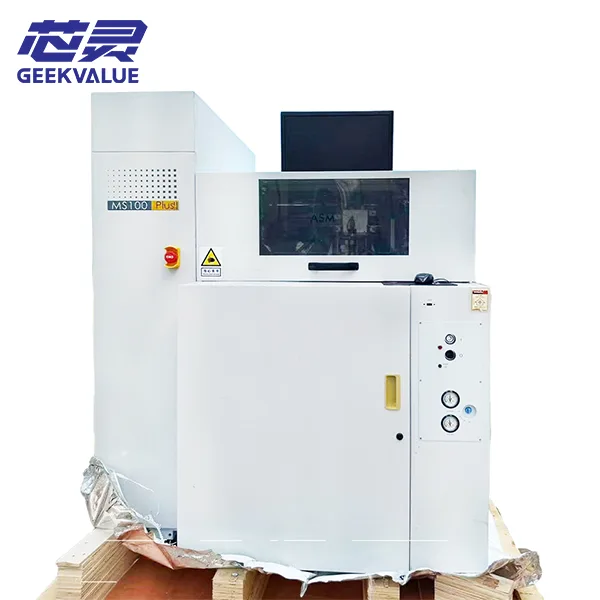
ASM MS100 Plus wafer mapping die sorter
Existing GEEKVALUE machine imageUsed ASM MS100 Plus equipment should be reviewed by the photographed unit, installed route and quoted delivery scope.
Current ASM MS100 Plus listing on GEEKVALUE
Current website listingUsed equipment
Available equipment record

Review the Existing ASM MS100 Plus Listing

GEEKVALUE already has a specific MS100 Plus equipment page with machine photographs and a direct quotation path. This new model page does not replace that listing; it helps buyers understand the model identity, the production route and the evidence that should be checked on the individual unit.

Open the Equipment Listing
Process position and internal routes

How the MS100 Plus Connects Wafer Data with Sorted Output

The model is most useful when it is understood as the middle of a production route: upstream inspection or probing prepares die and grade information, the sorter carries out the physical selection, and the output must be ready for the next operation.

Upstream evidence

Probe, inspect and prepare the map

The preceding process identifies die positions and grades and produces the map, bin or recipe information that the sorter will use.

Explore Probe Stations →
Test data

Keep grading information usable

The available production data must contain the grade definitions and traceability needed for the intended sorting route.

Browse Semiconductor Testers →
ASM MS100 Plus

Read, locate, pick and route

The machine uses the prepared data to locate selected die, lift them through the installed pickup arrangement and place them into the configured destination. The exact route follows the software, vision, tooling and output hardware installed on the used unit.

View Pick-and-Place Handler Equipment →
Sorted destination

Prepare the required frame or carrier

The number of grades, destination media and placement pattern must match the process that follows the sorter.

Explore Chip Handler Equipment →
Next operation

Move the selected die into assembly

After sorting, the die may continue to storage, inspection, packaging or a die-attach process depending on the production flow.

Browse Die Bonder Equipment →
Evidence-led model reference

What Can Be Stated Safely About MS100 Plus

Public records consistently support the model identity and map-sorting role, but detailed market descriptions often disagree or mix the machine with die-attach equipment. The page therefore separates stable model facts from configuration points that belong to the actual machine.

Model identity

ASM MS100 Plus is a separately listed model within the wider MS100 family and appears in used-equipment markets under ASM and ASMPT naming.

Equipment category

Used-equipment records and industry references place it in wafer-map-based die sorting, LED chip sorting or related pick-and-place sorting categories.

Core process role

The machine uses prepared map, bin or recipe information to identify selected die and route them into a sorted output through the installed handling system.

Configuration caution

Market listings may describe different arm, head, vision, frame or output arrangements. Those descriptions should be treated as unit-specific until the machine label, photographs and records confirm them.

Numerical specifications

No single public source reviewed for this page was reliable enough to establish a universal Plus speed, precision, wafer size or head configuration. Final values should come from the actual equipment record.

The existing GEEKVALUE product page contains several unverified upgrade and comparison claims. This model page intentionally does not repeat them as standard specifications.
Project fit

Three Questions Before Matching an MS100 Plus

The Plus model name is only the starting point. A useful review follows the die from the incoming frame, through the production data, to the required destination so the available machine can be checked as one complete route.

01

How does the die reach the pickup position?

The wafer or film-frame format, die layout, thickness, orientation and surface condition affect how the machine presents, supports and lifts each die. A frame photograph or drawing usually explains more than a nominal wafer diameter because it shows the actual loading and pickup relationship.

02

What data tells the machine what to select?

The available map, bin or recipe information must identify grades and destinations in a way the installed software can read. A physically suitable machine can still fail the project if the data route, grade definitions or program support cannot reproduce the intended sorting logic.

03

Where must the selected die go next?

The carrier, frame, number of grades, placement pattern, required volume and changeover frequency can alter the output modules and operating setup. The next production step therefore matters as much as the incoming material when evaluating a used sorter.

A first review can begin with one frame image and a short explanation of the grading method and required output. The remaining technical fields can be confirmed after the route is understood.

Discuss the Project Route
Used equipment review

Review the Actual MS100 Plus, Not a Generic Upgrade Story

Different used units can carry different handling routes, software, tooling and evidence of operation. The quotation should therefore explain the individual machine rather than rely on broad claims about what the “Plus” version is supposed to include.

Identity

Confirm the complete machine record

Check the manufacturer marking, exact model label, serial number, production year when available and current machine photographs. These details establish which unit is being quoted and help reveal rebuilt, modified or incomplete equipment.

Purchasing impact: prevents the current machine from being confused with generic MS100 Plus descriptions found online.
Installed route

Match the frame, pickup, vision and output hardware

The visible loading modules, pickup structure, cameras, lighting and destination hardware determine what the machine can physically handle. Photographs and configuration records should be compared with the project route before price becomes the main decision.

Purchasing impact: shows whether the unit already supports the process or needs conversion parts and engineering work.
Software and tooling

Check what is available beyond the base machine

Software version, map-data support, recipes, backups, holders, carriers and pickup tools can change how quickly the equipment can return to production. Missing records or tooling may create more work than the machine price first suggests.

Purchasing impact: identifies hidden preparation cost before the unit is accepted as production-ready.
Evidence and delivery

Connect the observed condition with the quotation

Useful evidence should show motion, vision, pickup and output functions as far as the available machine condition allows. The quotation should also state included accessories, known faults, packing method and any work that remains outside the delivery scope.

Purchasing impact: makes the commercial offer reflect the actual machine condition and responsibilities.
Model family navigation

Move Between the Three MS100 Model Pages

Each model has a separate landing page so users can reach the correct search target and available equipment without treating the three names as interchangeable.

Buyer questions

ASMPT MS100 Plus FAQ

These answers focus on the points that distinguish the new model landing page from the existing equipment listing and from the other MS100 model pages.

Is the ASM MS100 Plus a map sorter or a final test handler?

Public equipment records support a wafer-map-based die-sorting role. It may sit near test and grading operations, but the model name alone does not prove packaged-device contact testing, thermal conditioning or a direct ATE interface.

Does MS100 Plus always include a dual arm or dual head?

No universal configuration could be confirmed from reliable public sources. Some used listings mention dual swing-arm or other handling arrangements, but the actual head, arm, pickup and vision configuration should be verified on the individual machine.

Why keep the existing product page and create this new model page?

The existing page represents a specific website listing and quotation path. This model page supports the broader MS100 Plus search intent, explains the production route and directs users to the actual equipment record without copying the old page.

What should be sent for a first project review?

A frame photograph or drawing and a short explanation of how the die is graded and where it must be placed after sorting are enough to begin. More detailed data can be requested after the route has been understood.

Can GEEKVALUE help find another MS100 Plus unit?

You can submit the Plus model and the intended die-sorting route for sourcing review. Availability, configuration, condition and delivery scope will follow the actual equipment found.

Request a machine-specific quotation

Connect the MS100 Plus Listing with the Actual Die Route

Start with the current equipment page or send the incoming frame, grading method and required output. GEEKVALUE can then review the photographed machine, explain which configuration points still need confirmation and prepare the quotation around the actual unit.

Why do so many people choose to work with GeekValue?

Our brand is spreading from city to city, and countless people have asked me, "What is GeekValue?" It stems from a simple vision: to empower Chinese innovation with cutting-edge technology. This is a brand spirit of continuous improvement, hidden in our relentless pursuit of detail and the delight of exceeding expectations with every delivery. This almost obsessive craftsmanship and dedication is not only the persistence of our founders, but also the essence and warmth of our brand. We hope you will start here and give us an opportunity to create perfection. Let us work together to create the next "zero defect" miracle.

Details

Contact a sales expert

Reach out to our sales team to explore customized solutions that perfectly meet your business needs and address any questions you may have.

Sales Request

Follow Us

Stay connected with us to discover the latest innovations, exclusive offers, and insights that will elevate your business to the next level.

kfweixin

Scan to add WeChat

Request Quote