In semiconductor manufacturing environments, accurate spare part identification is essential for maintaining automated equipment performance and reducing unnecessary production downtime. When engineers or maintenance teams search for a specific component reference such as ASMPT Sunbird CP Driver 03111913, they are usually looking for part identification information, equipment relationship details, compatibility verification, and replacement guidance.
The term "Driver" can sometimes create confusion because it is commonly associated with computer software. However, in semiconductor equipment applications, a CP Driver generally refers to a hardware-related component involved in automation control, motion management, or equipment operation support.
This guide explains the purpose of ASMPT Sunbird CP Driver 03111913, its role in semiconductor automation systems, the relationship between CP Driver and CP Motor, important identification methods, troubleshooting considerations, and replacement practices for semiconductor equipment maintenance.
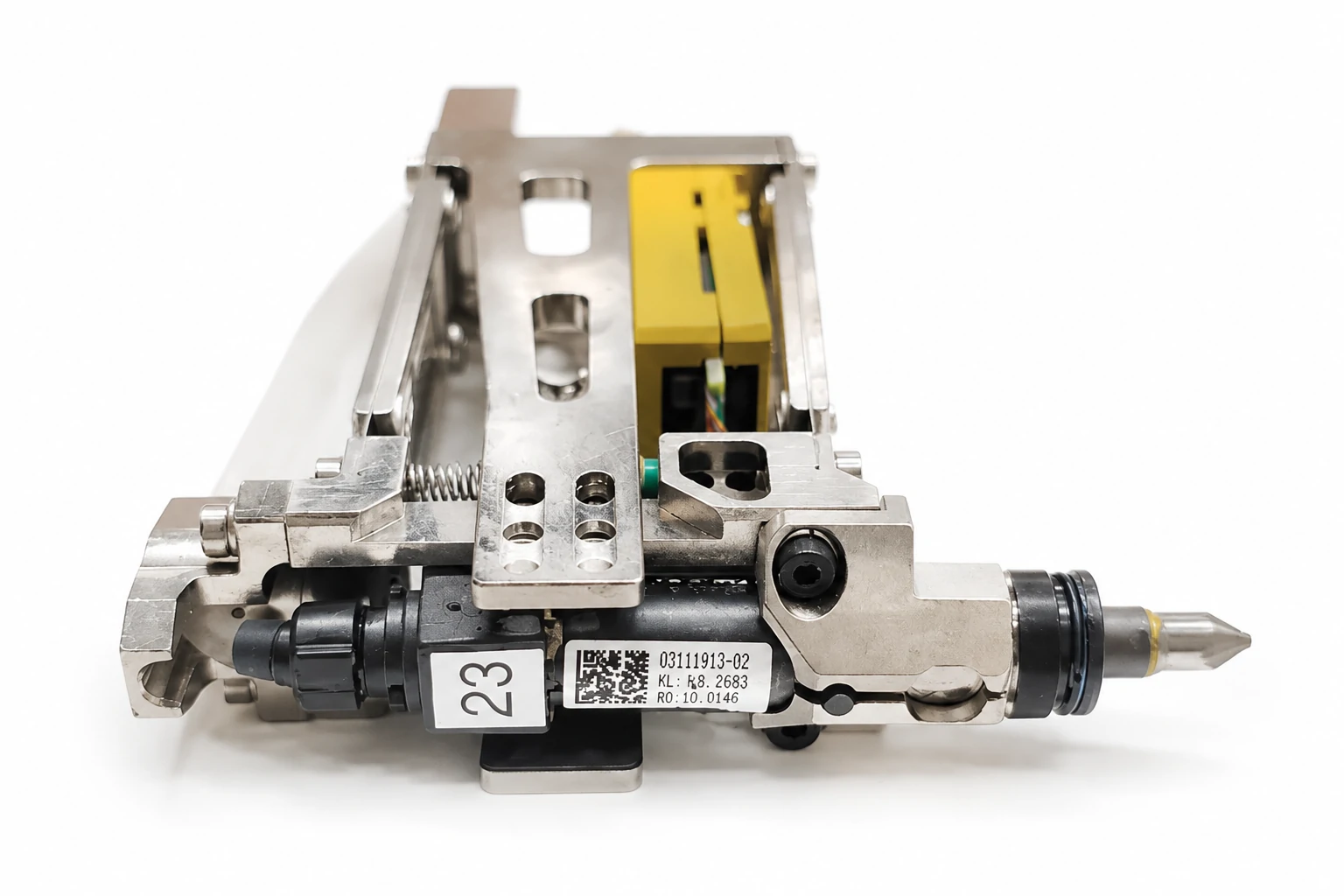
What Is ASMPT Sunbird CP Driver 03111913?
ASMPT Sunbird CP Driver 03111913 refers to a specific semiconductor equipment component reference associated with ASMPT Sunbird automation systems. Engineers searching for this part number are typically looking for component identification, maintenance records, equipment compatibility information, and replacement verification guidance.
In semiconductor manufacturing equipment, individual components work together to support automated device handling, positioning, and production workflows. A driver-related component generally belongs to the control side of an equipment system, helping coordinate communication between control units and hardware modules.
Because semiconductor equipment contains many electronic and mechanical components with similar names, correct part number verification is important before ordering or replacing any component.
Understanding the 03111913 Part Number
Part numbers are critical references in semiconductor equipment maintenance because they help engineers distinguish between components that may appear similar but have different applications or compatibility requirements.
The part number 03111913 supports maintenance activities such as:
Spare part identification
Equipment maintenance record management
Replacement verification
Supplier communication
Component lifecycle tracking
When replacing semiconductor equipment components, engineers should avoid relying only on component descriptions. Exact part number matching and equipment documentation review are important steps for preventing incorrect replacement.
How to Identify ASMPT Sunbird CP Driver 03111913
Correct identification is one of the most important steps in semiconductor spare part management. Selecting an incorrect component may result in installation problems, compatibility issues, or unnecessary equipment downtime.
Engineers should verify ASMPT Sunbird CP Driver 03111913 through multiple information sources:
Part number label:Check available component markings or identification labels.
Equipment documentation:Review approved manuals, spare part lists, and technical references.
Machine configuration:Confirm the component matches the specific equipment setup.
Maintenance records:Review previous replacement history and service information.
Supplier verification:Confirm component information through qualified spare part sources.
Using multiple verification methods reduces the risk of incorrect semiconductor equipment spare part selection.
ASMPT Sunbird Equipment Application Context
ASMPT Sunbird equipment operates within semiconductor automation environments where multiple mechanical, electrical, and control components work together to support production workflows.
A semiconductor automation system may include:
Motion-related components
Motor and drive systems
Control modules
Electronic interface components
Mechanical assemblies
Communication systems
A component such as ASMPT Sunbird CP Driver 03111913 should be understood as part of a larger equipment architecture rather than as an independent device.
Understanding CP Driver in Semiconductor Equipment
The meaning of "Driver" depends on the application environment. In computer systems, a driver usually refers to software that allows an operating system to communicate with hardware devices.
In semiconductor manufacturing equipment, however, a driver generally refers to a hardware-related control component that supports equipment operation, signal management, or communication between system modules.
Hardware Driver vs Software Driver
Understanding the difference between software drivers and equipment hardware drivers helps avoid confusion when researching semiconductor spare parts.
| Type | General Function |
|---|---|
| Software Driver | Allows computer operating systems to communicate with hardware devices. |
| Equipment Hardware Driver | Supports control signals, communication, or operation of industrial equipment components. |
For ASMPT Sunbird CP Driver 03111913, the term refers to a semiconductor equipment hardware component context rather than a computer software driver.
Role of CP Driver in Semiconductor Equipment Motion Systems
Many semiconductor automation systems rely on coordinated motion control architectures. A CP Driver may operate as part of a larger system that connects control commands with physical machine movement.
A simplified motion control structure can be understood as:
Controller:Provides operation commands and workflow instructions.
Driver:Processes control signals and manages operation of connected hardware components.
Motor:Converts controlled electrical input into physical movement.
Mechanical Assembly:Transfers movement to the required equipment mechanism.
Understanding this relationship helps engineers determine whether an equipment issue is related to the CP Driver, motor component, controller, or another part of the automation system.
General Functions of Driver Components
Driver-related components in industrial automation systems may support:
Communication between control systems and equipment modules
Management of operational signals
Coordination of automated equipment actions
Support for stable machine workflows
Control of connected motion-related components
The exact function of a specific ASMPT component depends on equipment design and configuration. Engineers should confirm technical details through approved documentation before maintenance action.
CP Driver and CP Motor: Why They Are Often Mentioned Together
When searching for ASMPT Sunbird spare parts, engineers may encounter both CP Driver and CP Motor terminology. These two components are often mentioned together because they are related to equipment motion and control systems.
However, CP Driver and CP Motor represent different component categories. Understanding their differences is important for correct spare part identification and maintenance planning.
General Difference Between Driver and Motor Components
The relationship between a driver and a motor can generally be explained through their different roles within an automation system.
| Component | General Role | System Function |
|---|---|---|
| CP Motor | Provides physical mechanical movement. | Converts electrical energy into mechanical motion. |
| CP Driver | Supports control and operation of motor-related functions. | Manages signals and controls connected equipment components. |
A motor performs the physical movement, while a driver generally manages the control side of that movement. The two components may work together in automated semiconductor equipment, but they should not be treated as the same spare part.
How Engineers Should Identify the Correct Component
Before ordering or replacing a semiconductor equipment component, engineers should confirm the exact component category and reference information.
Important verification items include:
Exact part number
Equipment model information
Machine configuration
Component identification records
Maintenance documentation
Supplier reference information
Correct identification helps reduce compatibility risks and prevents unnecessary maintenance delays.
ASMPT Sunbird CP Driver 03111913 Replacement Verification
Replacing semiconductor equipment components requires careful verification. A component name alone is not enough to confirm whether a replacement part is suitable.
For ASMPT Sunbird CP Driver 03111913 replacement evaluation, engineers should review equipment information, component references, and system configuration details.
Checking Equipment Documentation
Equipment documentation provides important information for confirming component identity and compatibility.
Useful references may include:
Equipment manuals
Maintenance documentation
Approved spare part lists
Machine configuration records
Previous service information
Documentation-based verification helps reduce incorrect component selection during maintenance activities.
Confirming Part Number Accuracy
Accurate part number verification is one of the most important steps in semiconductor machine replacement processes.
Before replacement, engineers should confirm:
Original component reference
Replacement part number
Equipment compatibility information
Supplier component records
Applicable machine configuration
Using incorrect semiconductor equipment replacement parts may create installation problems, compatibility issues, or production delays.
Checking Motion System Compatibility
Because CP Driver components may be related to equipment control systems, compatibility should include more than physical installation.
Engineers should consider:
Communication compatibility
Control system requirements
Related motor component information
Equipment configuration differences
Operational verification requirements
A replacement component should support the complete equipment system rather than only match the component name.
ASMPT Sunbird CP Driver 03111913 Replacement Process
A structured replacement process helps maintenance teams reduce risks and improve equipment recovery efficiency.
Step 1: Confirm Component Identification
Before replacement, verify:
Part number
Component category
Equipment model
Maintenance records
Correct identification prevents replacing the wrong component.
Step 2: Verify Compatibility
After confirming the component reference, engineers should verify compatibility with the installed equipment configuration.
Compatibility checks may include:
Electrical requirements
Communication interface
Mechanical installation requirements
Related system components
Step 3: Review Installation Requirements
Before installation, engineers should review applicable maintenance procedures and equipment requirements.
Important considerations include:
Correct installation location
Connection verification
System configuration settings
Post-installation inspection
Step 4: Perform Functional Verification
After installation, the equipment should be tested to confirm that the replacement component operates correctly.
Functional verification may include:
Equipment startup checks
Motion system verification
Alarm monitoring
Production workflow testing
Performance observation
A complete verification process helps ensure that the replacement component supports stable equipment operation.
Avoiding Incorrect Semiconductor Equipment Component Replacement
Incorrect spare part selection can create unnecessary maintenance challenges, including installation delays, troubleshooting complexity, and extended production downtime.
Good replacement practices include:
Confirming part numbers before purchase
Reviewing equipment documentation
Understanding component categories
Checking compatibility information
Maintaining accurate service records
Accurate spare part identification improves maintenance efficiency and supports semiconductor equipment reliability.
Troubleshooting Considerations for ASMPT Sunbird CP Driver
When semiconductor equipment experiences motion-related or control-related issues, the cause may involve multiple components within the automation system. A CP Driver-related problem should be evaluated through systematic troubleshooting rather than immediate component replacement.
Proper troubleshooting helps maintenance teams identify whether the issue is related to the CP Driver, connected motor components, controller signals, communication conditions, or other equipment modules.
Common CP Driver Related Issues
Possible indicators of CP Driver-related problems may include:
Motion control alarms
Communication errors between equipment modules
Abnormal equipment movement
Positioning instability
Unexpected equipment stops
Reduced automation workflow stability
These symptoms do not automatically confirm CP Driver failure. Engineers should complete appropriate diagnostic procedures before deciding whether replacement is required.
CP Driver Troubleshooting Steps
A structured troubleshooting process can help engineers identify the actual source of equipment problems.
Step 1: Review Equipment Alarm History
The first step is reviewing equipment alarms and operating history.
Important information may include:
Recent alarm messages
Error timing
Operating conditions when the issue occurred
Previous maintenance events
Step 2: Check Communication Status
Because driver components are involved in equipment control systems, communication conditions should be verified.
Engineers should check:
Connection status
Communication signals
Control system response
Related interface conditions
Step 3: Verify Power and Component Connections
Electrical and physical connections should be inspected before replacing components.
Verification may include:
Power supply conditions
Cable connections
Component installation status
Related motion system connections
Step 4: Check Related Motor and Motion Components
Because CP Driver and CP Motor components work together within motion systems, engineers should also evaluate related components.
Inspection areas may include:
Motor operating condition
Mechanical movement
Positioning performance
Controller signals
Step 5: Perform Functional Verification
After troubleshooting or replacement, equipment operation should be verified through functional testing.
Verification may include:
Equipment startup testing
Motion operation checks
Alarm monitoring
Production workflow confirmation
Maintenance Tips for ASMPT Semiconductor Equipment Components
Proper maintenance practices help semiconductor manufacturers improve equipment availability and reduce unexpected interruptions.
Component Identification Records
Maintaining accurate component records helps engineers manage semiconductor equipment throughout its operational lifecycle.
Important records include:
Part numbers
Equipment history
Replacement records
Maintenance notes
Troubleshooting history
Clear records make future component identification and maintenance activities more efficient.
Preventive Maintenance Practices
Preventive maintenance helps identify potential issues before they affect production operations.
Recommended practices include:
Regular equipment inspection
Monitoring equipment alarms
Reviewing component operating conditions
Tracking replacement cycles
Updating maintenance documentation
Spare Part Management Practices
Effective spare part management supports faster maintenance response and reduces production risks.
Recommended practices include:
Maintaining spare inventory records
Verifying component information before storage
Tracking replacement history
Preparing critical spare information in advance
Confirming supplier information
ASMPT Sunbird CP Driver 03111913 Maintenance Checklist
Before replacing or managing ASMPT Sunbird CP Driver 03111913, engineers can review the following checklist:
Part Number Verification:Confirm the exact component reference and identification information.
Equipment Compatibility:Verify the component matches the specific Sunbird equipment configuration.
Motion System Relationship:Understand the relationship between CP Driver, CP Motor, controller, and related components.
Documentation Review:Check maintenance records, equipment manuals, and spare part references.
Troubleshooting Confirmation:Verify the actual cause of equipment issues before replacement.
Functional Testing:Confirm stable operation after installation or maintenance.
Frequently Asked Questions
What is ASMPT Sunbird CP Driver 03111913?
ASMPT Sunbird CP Driver 03111913 is a specific semiconductor equipment component reference searched by engineers for identification, maintenance, and replacement verification purposes.
Is ASMPT Sunbird CP Driver hardware or software?
In semiconductor equipment applications, CP Driver refers to a hardware-related component used within automation systems rather than a computer software driver.
Are CP Motor and CP Driver the same component?
No. CP Motor and CP Driver are different component categories. A motor generally provides physical movement, while a driver generally supports control and operation of motion-related equipment components.
How can engineers verify ASMPT Sunbird CP Driver 03111913 compatibility?
Engineers can verify compatibility by checking the exact part number, equipment model, machine configuration, maintenance records, supplier information, and approved component references.
What problems may indicate a CP Driver-related issue?
Possible indicators include motion alarms, communication problems, abnormal equipment movement, positioning instability, and unexpected equipment stops. Proper troubleshooting should be completed before component replacement.
Why is spare part identification important for semiconductor equipment?
Accurate spare part identification helps prevent incorrect replacement, reduces maintenance delays, improves equipment reliability, and supports stable semiconductor production operations.
Conclusion
ASMPT Sunbird CP Driver 03111913 is a specific semiconductor equipment component reference that requires accurate identification and documentation-based verification before replacement.
Understanding the role of CP Driver components, the relationship between CP Driver and CP Motor, and proper troubleshooting methods helps engineers maintain semiconductor automation equipment more effectively.
For semiconductor equipment maintenance teams, accurate part verification, structured troubleshooting, and effective spare part management are essential steps for maintaining reliable production operations.